How do I assign a conversation to a colleague in SyBox?
Updated
In SyBox, this is done in Inbox > Assigning, departments and labels. 1) Open the conversation and click the assign button in the header. If your access scope "Users they can assign to" names colleagues, it opens a menu: "Assign to me" (or "Unassign"), then the colleagues you may assign to who can also see this conversation. 2) Click a colleague. If nobody fits, the menu says "Nobody else you can assign to can see this conversation".
How to assign a conversation to a colleague
- Open the conversation and click the assign button in the header. If your access scope "Users they can assign to" names colleagues, it opens a menu: "Assign to me" (or "Unassign"), then the colleagues you may assign to who can also see this conversation.
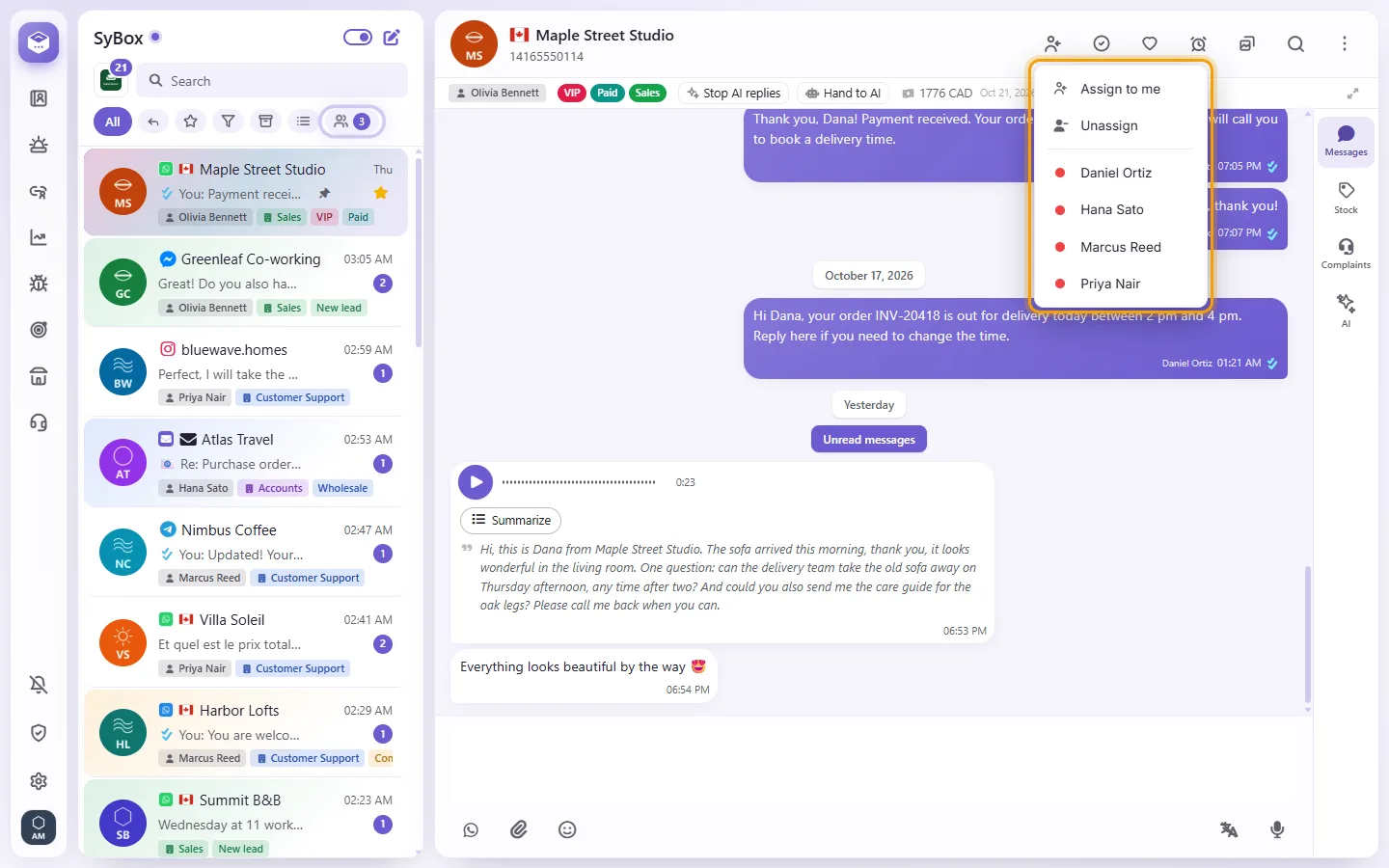
- Click a colleague. If nobody fits, the menu says "Nobody else you can assign to can see this conversation".
With "None" (the default for a new user), the button only assigns the conversation to you or unassigns it. Taking a conversation off a colleague also needs your scope to name that colleague. Your admin sets the scope in Settings > Users ("Users they can assign to"). Automatic assignment rules are in Settings > AI and automation > Automations ("Assign to user" or "Assign in rotation").
More about Assigning, departments and labels.